
logologo
search_icon
search_iconAll
search_iconContinue Playing
search_iconHot Games
search_iconNew Games
search_iconSimulation
search_iconAdventure
search_iconAction
search_iconStrategy
search_iconCasual
search_iconRacing
search_iconPuzzle
search_iconSports
search_iconMore
AboutAbout
BusinessBusiness
PrivacyPrivacy
TermsTerms

© 2026 minigame.com

mascot

Join The Minis With Friends

search_icon
search_icon
search_icon
search_icon
search_icon
search_icon
search_icon
search_icon
search_icon
search_icon
search_icon
search_icon
more_icon
AboutBusinessPrivacyTerms
logo
Remove One Part

Remove One Part

Recommended
Help The Duck
Follow My Command
Brain Flex
Ball Fall
Sheep Sheep
Small Wardrobe
Bubble it Jam
Jelly Merge
Flower Match 3
Mouse Hole
Drag The Block
Slices
Stone Link
Color Water Sort
Halloween Craft
Halloween Blocks
Remove One Part

Remove One Part

5puzzlePuzzle
Play Now
0
Like
Dislike
Add to favorites
Feedback
Remove One Part
BlackJack

BlackJack

BlackJack
BlackJack741.3K
Sky Rush

Sky Rush

Sky Rush
Sky Rush564.5K
Draw Bridge

Draw Bridge

Draw Bridge
Draw Bridge428.2K
Save The Man

Save The Man

Save The Man
Save The Man828.5K
2248 Puzzle

2248 Puzzle

2248 Puzzle
2248 Puzzle439.3K
Merge Dice

Merge Dice

Merge Dice
Merge Dice407.7K
Cat Defenders: Shelling Snake

Cat Defenders: Shelling Snake

Cat Defenders: Shelling Snake
Cat Defenders: Shelling Snake899.6K
One Line

One Line

One Line
One Line649.2K
Draw Color

Draw Color

Draw Color
Draw Color266.0K
Farm Escape

Farm Escape

Farm Escape
Farm Escape551.8K
AboutBusinessPrivacy
logo

© 2026 minigame.com

Games>
Puzzle>
Remove One Part

Remove One Part

Rating
5
Orientation
Portrait
Release Date
2024-02-18
Puzzle

What is Remove One Part

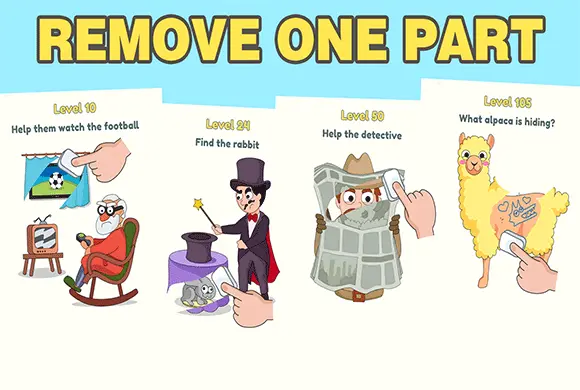
Remove One Part is an incredibly fun and addictive hyper-casual puzzle game that challenges your creativity and logical thinking. In this popular "Delete One Part" (DOP) style adventure, players are presented with amusing 2D scenarios where something just isn't quite right. Your only tool is a simple magical eraser. By analyzing the scene and swiping your finger, you can erase a specific part of the drawing to uncover hidden truths, correct intentional mistakes, or reveal a hilarious plot twist. From helping a man shave his messy beard to discovering a princess hidden under a muscular disguise, every level offers a unique and bizarre challenge. The game perfectly blends humor with brain-teasing logic, ensuring that you will laugh out loud while giving your brain a light workout. It is the ultimate stress-relieving game for players of all ages who love clever visual puzzles.

Key Game Features

Creative Logic Puzzles: Each level features a unique situation requiring lateral thinking and sharp observation to figure out exactly what needs to be erased. Hilarious Plot Twists: Discover funny and unexpected endings hiding beneath the surface as you erase the disguised layers of the drawing. Satisfying Eraser Mechanic: Enjoy the simple, stress-relieving feeling of swiping your finger across the screen to magically wipe away parts of the image. Diverse Scenarios: From fixing math equations to finding hidden characters, the game offers a wide variety of themes to keep you entertained.

How to Play & Master

Playing Remove One Part is incredibly intuitive and accessible. When a level starts, you will see a colorful cartoon scene and a short text prompt at the top of the screen telling you what your objective is (for example, "Help him to shave" or "Find the way out"). Take a moment to look closely at the image to identify what is wrong, out of place, or hiding the potential solution. To take action, simply touch the screen and drag your finger over the area you want to delete. An eraser icon will follow your finger, and the top layer of the drawing will be wiped away. You only need to erase the specific, correct part of the image to trigger the solution. If you erase the right spot, a green checkmark will appear, and you will be treated to a funny animation showing the outcome of your action before seamlessly moving on to the next level. If you find yourself stuck on a tricky puzzle, don't worry! You can tap the "Hint" lightbulb icon at the bottom of the screen to get a helpful clue to point you in the right direction.

Game Controls

Touch and hold your finger anywhere on the screen, then drag it across the specific area of the drawing you wish to erase. Tap the lightbulb icon if you need to use a hint.

Frequently Asked Questions (FAQ)

Q: I'm erasing everything but nothing is happening. What's wrong? A: You might be erasing the wrong object. The game requires you to erase one specific part. Try to think outside the box and focus on a different area of the scene. Q: How do I get more hints if I run out? A: You can usually earn free hints by tapping the hint button and watching a short sponsored video advertisement.