Color Border
Rating
5
Orientation
Portrait
Release Date
2024-01-29
What is Color Border
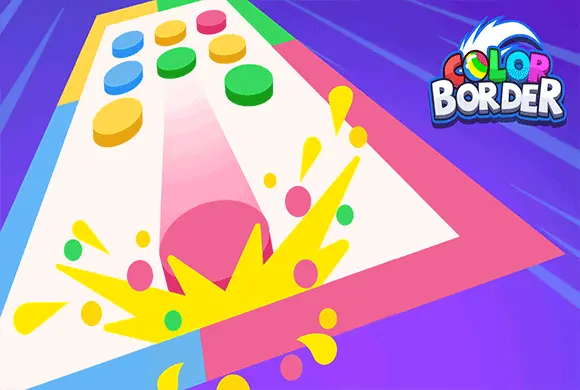
Welcome to "Color Border," a highly addictive and fast-paced puzzle game that will test your observation skills and reflexes! The premise is simple but engaging: a variety of colorful balls will appear in the center of the screen, and your objective is to quickly sort them by sliding each ball towards the border that matches its color. For example, blue balls go to the blue side, green balls to the green side. As you progress, the game becomes more challenging with more balls appearing at once. You can score massive combos by sliding multiple balls of the same color simultaneously. With the coins you earn from achieving high scores, you can purchase upgrades like "Time Bonus for Correct Moves" or unlock adorable new ball skins like orange slices. "Color Sort Master" is the perfect hyper-casual game to kill time and sharpen your mind!
Key Game Features
Intuitive Sorting Gameplay: Simply swipe to match the ball color with the border color.
Combo System: Slide multiple balls of the same color at once to maximize your score and combo meter.
Upgrades & Buffs: Use coins to upgrade your time limits or reduce penalties for mistakes.
Unlockable Skins: Customize your game by unlocking fun fruit skins for the balls.
Fast-Paced Action: Keep up with the increasing speed as you clear the board.
How to Play & Master
Playing "Color Sort Master" is easy to learn but challenging to master. Here's how you do it:
Step 1: Observe the colors of the borders on the screen.
Step 2: When colored balls appear in the middle, tap and drag them towards the border of the same color. For example, slide a blue ball to the blue border.
Step 3: To score higher, try to group multiple balls of the same color together and slide them out in one go to achieve a combo.
Step 4: Be careful! If you slide a ball to the wrong color border, you will be penalized (e.g., losing time).
Step 5: The game is timed. You must keep sorting balls quickly to earn time bonuses and survive as long as possible to set a new high score. Use the coins earned to upgrade your abilities in the main menu!
Game Controls
Swipe/Drag: Tap on a ball (or a group of balls) and quickly swipe your finger towards the correct colored border on the screen.
Frequently Asked Questions (FAQ)
Q: What happens if I swipe a ball to the wrong color?
A: You will lose time from your overall timer. Be careful and accurate!
Q: How do I get those fruit skins?
A: In the main menu, go to the "Skin Shop" (皮肤商店). You can unlock new skins by completing more levels or achieving higher scores.
Q: What do the upgrades in the main menu do?
A: Upgrades help you survive longer. For example, "Level 1" upgrades might increase the time bonus you get for a correct sort, or decrease the time penalty for a wrong move.













 781.6K